<Struct 실무 정리>
#case 1 Struct구조 데이터셋 생성
WITH array_in_struct AS ( # RECORD/NULLABLE

  SELECT STRUCT('kyle' as name, ['python','SQL','Scala'] as preferred_language, 31 as age) AS new_struct

  UNION ALL

  SELECT STRUCT('max', ['SQL','Go'], 29)

),


struct_in_array AS ( # RECORD/REPEATED

SELECT

    ARRAY(

      SELECT AS STRUCT 'kyle' as name, ['python','SQL','Scala'] as preferred_language, 31 as age

      UNION ALL

      SELECT AS STRUCT 'max', ['SQL','Go'], 29

    ) AS new_struct

)


SELECT *

FROM array_in_struct
쿼리 결과
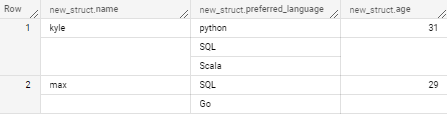

→ 다음과 같이 하나의 Sturct구조로 Record 필드 하나안에 모든 컬럼이 종속된다.
그래서 결과값을 보면 new_struct.[컬럼명]과 같은 형태로 컬럼명들이 이루어져있다.
struct구조안에 특정 필드를 지정하여 쿼리를 추출하고싶은경우 단독 select형태로는 추출이 불가능하며 반드시 unnest로 풀어줘야만 쿼리로 데이터 추출이 가능하다.
#case 2 STRUCT구조 UNNEST
WITH array_in_struct AS ( # RECORD/NULLABLE

  SELECT STRUCT('kyle' as name, ['python','SQL','Scala'] as preferred_language, 31 as age) AS new_struct

  UNION ALL

  SELECT STRUCT('max', ['SQL','Go'], 29)

),


struct_in_array AS ( # RECORD/REPEATED

SELECT

    ARRAY(

      SELECT AS STRUCT 'kyle' as name, ['python','SQL','Scala'] as preferred_language, 31 as age

      UNION ALL

      SELECT AS STRUCT 'max', ['SQL','Go'], 29

    ) AS new_struct

)


# STRUCT UNNEST

SELECT #*,

new_struct.name, unnest_preferred_language, new_struct.age

-- FROM array_in_struct, UNNEST(array_in_struct.new_struct) # UNNEST는 array에만 적용가능

FROM array_in_struct CROSS JOIN UNNEST(array_in_struct.new_struct.preferred_language) as unnest_preferred_language # STRUCT 내 ARRAY를 UNNEST
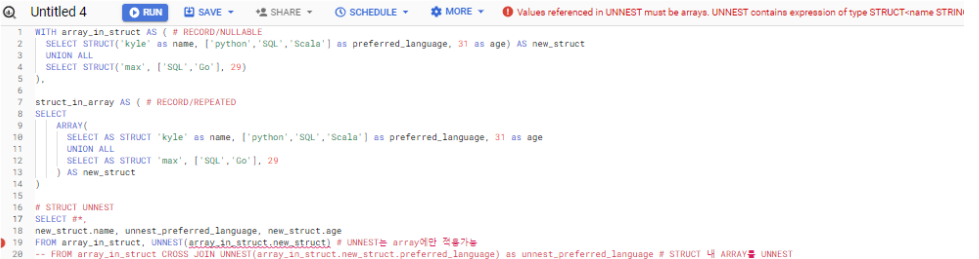
→ FROM array_in_struct, UNNEST(array_in_struct.new_struct) 이 경우 쿼리문에 다음과 같이 오류가 발생함 / struct기준으로 UNNEST를 했기 때문
쿼리 결과

→ array와 다르게 struct 구조에서는 단순 UNNEST를 사용하여 푸는것이 불가능하다 위에 쿼리에 보이는바와 같이 Join 형태로 UNNEST를 사용해야 STRUCT의 ARRAY를 UNNEST로 풀 수 있다.
#case 3 특정 값이 있는 row를 찾고자 하는 경우
WITH array_in_struct AS ( # RECORD/NULLABLE

  SELECT STRUCT('kyle' as name, ['python','SQL','Scala'] as preferred_language, 31 as age) AS new_struct

  UNION ALL

  SELECT STRUCT('max', ['SQL','Go'], 29)

),


struct_in_array AS ( # RECORD/REPEATED

SELECT

    ARRAY(

      SELECT AS STRUCT 'kyle' as name, ['python','SQL','Scala'] as preferred_language, 31 as age

      UNION ALL

      SELECT AS STRUCT 'max', ['SQL','Go'], 29

    ) AS new_struct

)


# 특정 값이 있는 raw row를 찾고자 할 때

SELECT *

FROM array_in_struct

WHERE 'Go' IN UNNEST(array_in_struct.new_struct.preferred_language) #OR 'SQL' IN UNNEST(array_in_struct.new_struct.preferred_language)
쿼리 결과


다음과 같이 Go가 해당되는 struct구조 그대로 출력된다.
#case 4 특정 값이 있는 UNNEST row를 찾고자 하는 경우
WITH array_in_struct AS ( # RECORD/NULLABLE

  SELECT STRUCT('kyle' as name, ['python','SQL','Scala'] as preferred_language, 31 as age) AS new_struct

  UNION ALL

  SELECT STRUCT('max', ['SQL','Go'], 29)

),


struct_in_array AS ( # RECORD/REPEATED

SELECT

    ARRAY(

      SELECT AS STRUCT 'kyle' as name, ['python','SQL','Scala'] as preferred_language, 31 as age

      UNION ALL

      SELECT AS STRUCT 'max', ['SQL','Go'], 29

    ) AS new_struct

)


# 특정 값이 있는 UNNEST row를 찾고자 할 때

SELECT new_struct.name, unnest_preferred_language, new_struct.age

FROM array_in_struct, UNNEST(array_in_struct.new_struct.preferred_language) as unnest_preferred_language

WHERE unnest_preferred_language = 'Go'
쿼리 결과


→ 위 경우
#case 5 Struct_in_array, array_in_struct 테이블 확인 --> struct array 상세 비교를 위해 중간과정에서 검토
WITH array_in_struct AS ( # RECORD/NULLABLE
  SELECT STRUCT('kyle' as name, ['python','SQL','Scala'] as preferred_language, 31 as age) AS new_struct
  UNION ALL
  SELECT STRUCT('max', ['SQL','Go'], 29)
),

struct_in_array AS ( # RECORD/REPEATED
SELECT
    ARRAY(
      SELECT AS STRUCT 'kyle' as name, ['python','SQL','Scala'] as preferred_language, 31 as age
      UNION ALL
      SELECT AS STRUCT 'max', ['SQL','Go'], 29
    ) AS new_struct
)


SELECT *
FROM struct_in_array;
쿼리 결과(struct_in_array)


쿼리 결과(array_in_struct)

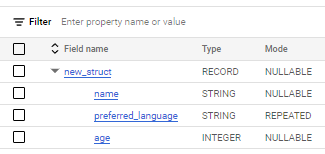
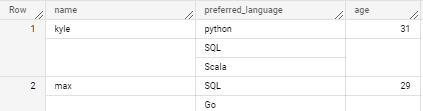
#case 6 STRUCT ARRAY UNNEST, struct을 unnest하면 Record type 풀림, struct안에 array row만큼 row 생성
WITH array_in_struct AS ( # RECORD/NULLABLE

  SELECT STRUCT('kyle' as name, ['python','SQL','Scala'] as preferred_language, 31 as age) AS new_struct

  UNION ALL

  SELECT STRUCT('max', ['SQL','Go'], 29)

),


struct_in_array AS ( # RECORD/REPEATED

SELECT

    ARRAY(

      SELECT AS STRUCT 'kyle' as name, ['python','SQL','Scala'] as preferred_language, 31 as age

      UNION ALL

      SELECT AS STRUCT 'max', ['SQL','Go'], 29

    ) AS new_struct

)


SELECT #*

name, preferred_language, age

FROM struct_in_array, UNNEST(struct_in_array.new_struct); # 이제부터 ARRAY 구조로 QUERY 수행
쿼리 결과
#case 6-1
WITH array_in_struct AS ( # RECORD/NULLABLE

  SELECT STRUCT('kyle' as name, ['python','SQL','Scala'] as preferred_language, 31 as age) AS new_struct

  UNION ALL

  SELECT STRUCT('max', ['SQL','Go'], 29)

),


struct_in_array AS ( # RECORD/REPEATED

SELECT

    ARRAY(

      SELECT AS STRUCT 'kyle' as name, ['python','SQL','Scala'] as preferred_language, 31 as age

      UNION ALL

      SELECT AS STRUCT 'max', ['SQL','Go'], 29

    ) AS new_struct

)


SELECT *

-- name, preferred_language, age

FROM struct_in_array, UNNEST(struct_in_array.new_struct); # 이제부터 ARRAY 구조로 QUERY 수행
쿼리 결과

→ sturct값이 *2가 된다. UNNEST(struct_in_array.new_struct)으로 인하여
# case 7 STRUCT 내 ARRAY를 UNNEST하면 array length만큼 row 생성
WITH array_in_struct AS ( # RECORD/NULLABLE

  SELECT STRUCT('kyle' as name, ['python','SQL','Scala'] as preferred_language, 31 as age) AS new_struct

  UNION ALL

  SELECT STRUCT('max', ['SQL','Go'], 29)

),


struct_in_array AS ( # RECORD/REPEATED

SELECT

    ARRAY(

      SELECT AS STRUCT 'kyle' as name, ['python','SQL','Scala'] as preferred_language, 31 as age

      UNION ALL

      SELECT AS STRUCT 'max', ['SQL','Go'], 29

    ) AS new_struct

)


SELECT #*

name, unnest_preferred_language, age

FROM struct_in_array, UNNEST(struct_in_array.new_struct), UNNEST(preferred_language) as unnest_preferred_language; # preferred_language을 바로 UNNEST할 수 없다
쿼리 결과
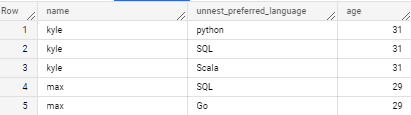
→ record repeated 안에 컬럼 repeated 같은 경우 한 번에 UNNEST로 풀어낼 수 없다. 그렇기 때문에 두 번에 걸쳐서 풀어서 다음과 같이 사용해야한다.
# case 7-1 STRUCT 내 ARRAY를 UNNEST하면 array length만큼 row 생성(ALL)
WITH array_in_struct AS ( # RECORD/NULLABLE

  SELECT STRUCT('kyle' as name, ['python','SQL','Scala'] as preferred_language, 31 as age) AS new_struct

  UNION ALL

  SELECT STRUCT('max', ['SQL','Go'], 29)

),


struct_in_array AS ( # RECORD/REPEATED

SELECT

    ARRAY(

      SELECT AS STRUCT 'kyle' as name, ['python','SQL','Scala'] as preferred_language, 31 as age

      UNION ALL

      SELECT AS STRUCT 'max', ['SQL','Go'], 29

    ) AS new_struct

)


SELECT *

-- name, unnest_preferred_language, age

FROM struct_in_array, UNNEST(struct_in_array.new_struct), UNNEST(preferred_language) as unnest_preferred_language; # preferred_language을 바로 UNNEST할 수 없다
쿼리 결과
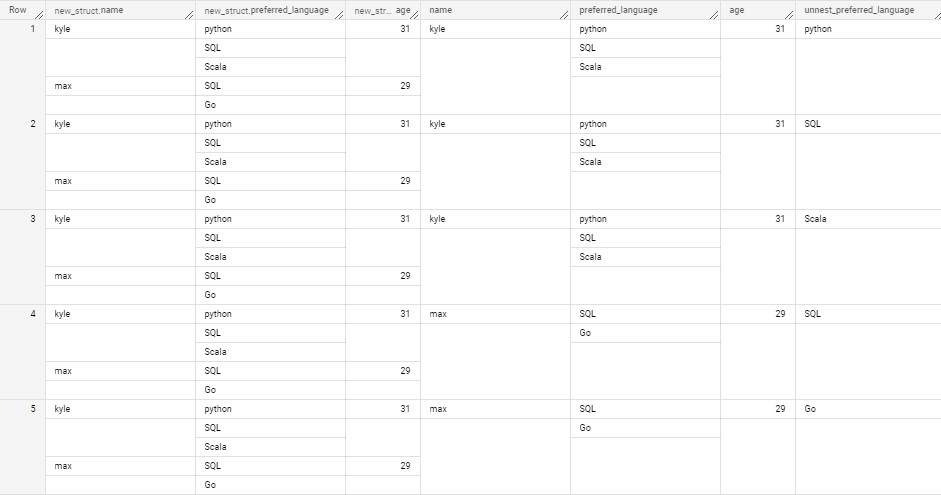
→ 다음과 같이
# case 8 STRUCT 구조 조건절
WITH array_in_struct AS ( # RECORD/NULLABLE
  SELECT STRUCT('kyle' as name, ['python','SQL','Scala'] as preferred_language, 31 as age) AS new_struct
  UNION ALL
  SELECT STRUCT('max', ['SQL','Go'], 29)
),


struct_in_array AS ( # RECORD/REPEATED
SELECT
    ARRAY(
      SELECT AS STRUCT 'kyle' as name, ['python','SQL','Scala'] as preferred_language, 31 as age
      UNION ALL
      SELECT AS STRUCT 'max', ['SQL','Go'], 29
    ) AS new_struct
)


SELECT *
-- FROM struct_in_array
-- SELECT name, preferred_language, age
FROM struct_in_array, UNNEST(struct_in_array.new_struct) as c
-- WHERE 'Go' IN UNNEST(struct_in_array.new_struct.preferred_language) # UNNEST가 바라보고 있는 preferred_language는 STRUCT ARRAY 구조의 preferred_language이므로 원하는 WHERE 결과를 볼 수 없다
WHERE 'Go' IN UNNEST(c.preferred_language) # UNNEST STRUCT의 preferred_language를 바라보도록 해야 원하는 WHERE 결과 확인
쿼리 결과

→ STRUCT에서는 특정 값을 찾고자해도 row가 하나로 묶여있기 때문에 원하는 row level(tier)까지 FROM에서 UNNEST를 해줘야함. 특정 값을 찾을 수 있지만 UNNEST한 결과를 가져오는 것은 아님
#특정 값을 원하는 row만들(UNNEST한 row) 결과로 찾고자 할 경우
SELECT #*,
name, unnest_preferred_language, age
FROM struct_in_array, UNNEST(struct_in_array.new_struct), UNNEST(preferred_language) as unnest_preferred_language
WHERE unnest_preferred_language = 'Go'
쿼리 결과

→ 다음과 같이 unnest로 다 풀어주고 조건절걸면 다음과 같이 원하는 특정값의 row 한 줄을 확인할 수 있게 된다.
'GCP > Data Analytics' 카테고리의 다른 글
| [GA] 티스토리 블로그를 GA에 연동하는 방법 (0) | 2023.04.27 |
|---|---|
| [GCP] Bigquery Array 사용 방법 정리 (0) | 2023.04.19 |